Update (2026-05-12): The
claude-config-templaterepo referenced below has been retired. It is replaced by codebench.
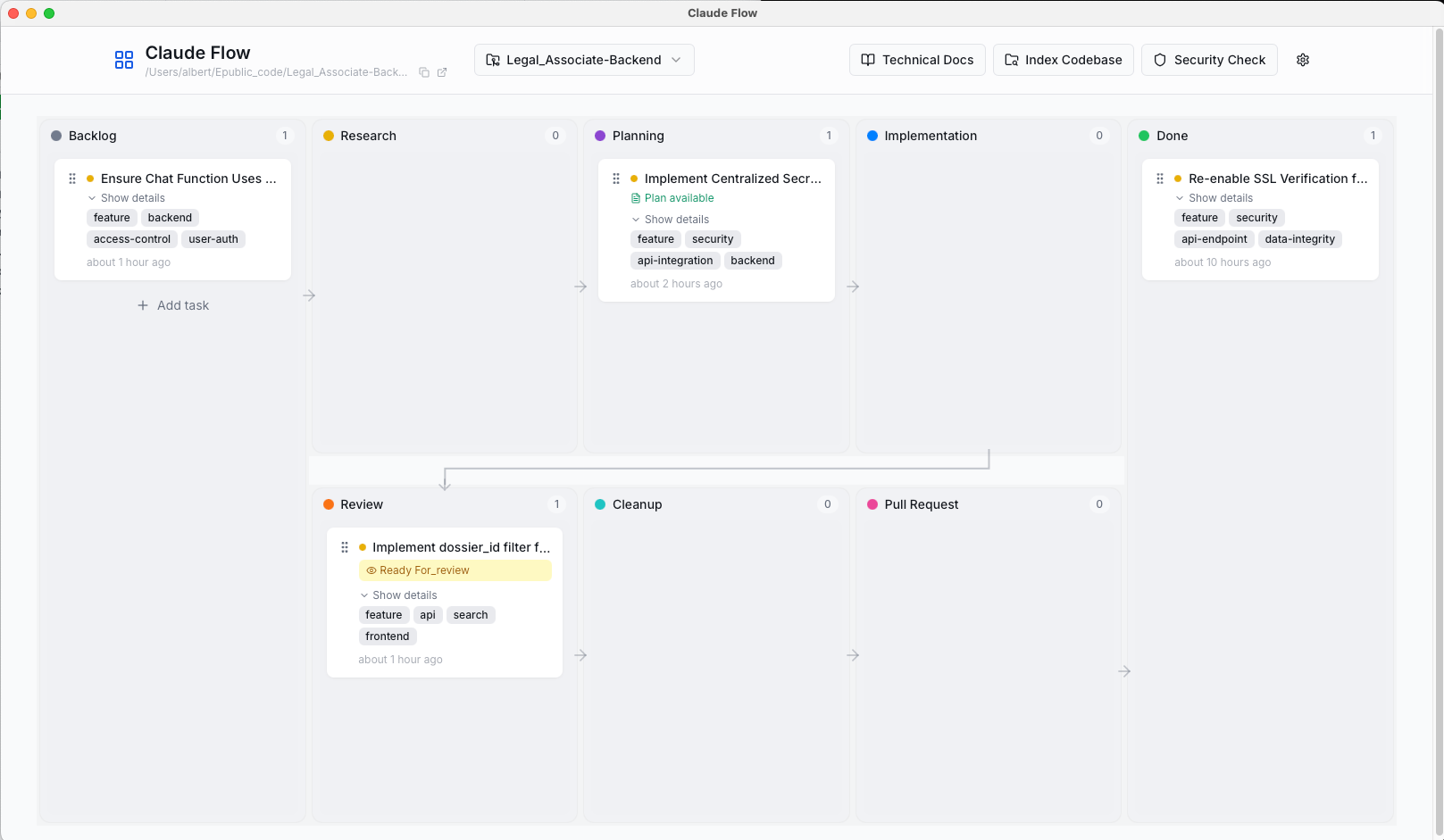
A few weeks ago I mentioned I was building Claude Flow—a kanban board UI for my claude-config-template. The basic idea: visual task tracking for Claude workflows, hooks that update tasks in real-time, and a cleaner way to manage slash commands. Of course, I had to build it myself because no existing tool fit the bill. Manly because I wanted tight integration with the commands I was already using, and I learned to trust.
The initial implementation worked. Each repo got its own Claude Flow instance with a random port and local database. This created an immediate problem: hooks broke constantly because they couldn’t find the server. Dynamic ports meant hooks had no stable target. Multiple databases meant no central view of tasks across projects.
So long story short: I rebuilt it into a central app with multi-repo support. One server on a fixed port, one database with repo-aware schema, and hooks that always work. Here’s how I did it, the trade-offs, and what I learned.
The Per-Repo Problem
My first attempt followed the per repo pattern: install Claude Flow in each repo. Launch it per-repo with an available port. And store tasks in a local SQLite database inside the repo.
This seemed reasonable initially:
- Isolated: Each project has its own task database
- Simple: No coordination between repos needed
- Portable: run the install script, everything comes with it
In practice, it was a mess:
repo-A/.claude/claude-flow/  (port 52341)
repo-B/.claude/claude-flow/  (port 52387)
repo-C/.claude/claude-flow/  (port 51993)
The hooks need to post updates to the backend—new task created, task completed, artifact saved. But which port? The hooks run in .claude/hooks/ and get triggered by Claude Code. They have no idea what port the UI launched on. I tried writing the port to a file, reading it from hooks. That did not work!
Also: switching between repos meant launching different instances, losing context. Want to see all your tasks across projects? Too bad. Each database only knows about one repo.
The Global App Solution
The fix was obvious from the beginning, but I was hoping not to go their, afraid of too much complexity. But in retrospect this was the right step: stop treating Claude Flow as a per-repo tool. Make it a global system-level app.
New architecture:
- One app running on fixed port 9118
- One database at
~/Library/Application Support/claude-flow/database.db - Repo-aware schema with
repo_idcolumn on every task - Hooks always target
localhost:9118(why? See my previous post on choosing development ports that don’t conflict)
Now hooks just work. They don’t need to discover ports. The backend accepts tasks from any repo, tags them with repo_id, and stores everything centrally. The frontend shows a repo selector dropdown—pick which project you want to view.
Implementation Details
The refactor touched a lot. These were the main changes:
Database Schema
Added repo_id to track which repo each task belongs to:
class TaskDB(Base):
    __tablename__ = "tasks"

    id = Column(Integer, primary_key=True, index=True)
    repo_id = Column(String(500), nullable=False, index=True)
    title = Column(String(500), nullable=False)
    description = Column(Text)
    status = Column(String(50), nullable=False)
    # ... other fields
Also added a RepoDB table for tracking registered repositories (name, path, last active timestamp).
API Endpoints
All task endpoints now filter by repo_id:
@router.get("/tasks")
def get_tasks(repo_id: str = Query(None), db: Session = Depends(get_db)):
    query = db.query(TaskDB)
    if repo_id:
        query = query.filter(TaskDB.repo_id == repo_id)
    return query.order_by(TaskDB.created_at.desc()).all()
New repo management endpoints let the frontend list repos, add new ones, remove old ones. The backend auto-registers repos when hooks first post from them—reduces setup friction.
Fixed Port
The desktop app now always uses port 9118:
port = 9118  # Fixed for hook compatibility

# Check if already running
try:
    response = requests.get(f"http://localhost:{port}/health", timeout=1)
    if response.status_code == 200:
        webbrowser.open(f"http://localhost:{port}")
        return
except:
    pass

# Start server
uvicorn.run(app, host="0.0.0.0", port=port)
If you launch it twice, the second instance detects the running server and just opens your browser to the existing app. Nice UX, avoids port conflicts. Or you can just launch the ‘Claude Flow’ from applications.
Desktop App Wrapper
Claude Flow runs as a native desktop app using pywebview. Even though Electron was the obvious choice—it’s what VS Code, Slack, and Discord use—I went with pywebview for one reason: bundle size.
Electron ships an entire Chromium browser and Node.js runtime. That’s 100-200MB minimum, even for a simple app. PyWebView uses your system’s native webview (WebKit on macOS, Edge WebView2 on Windows, GTK on Linux), adding only ~5MB. Smalll, fast –> Good enough for me.
Instead of opening tabs in your default browser, pywebview creates a standalone window that feels like a proper application:
import webview
import threading

# Start FastAPI in background thread
server_thread = threading.Thread(target=start_server, daemon=True)
server_thread.start()

# Create native window
webview.create_window("Claude Flow", f"http://localhost:{port}", width=1200, height=800)
webview.start()
This gives you:
- Native window controls: Minimize, maximize, close work as expected
- Menu bar integration: On macOS, it appears in the dock like any other app
- No browser chrome: No address bar, bookmarks, or extensions cluttering the interface
- Better resource isolation: Separate from your browser’s memory footprint
PyWebView uses your system’s native webview (WebKit on macOS, Edge WebView2 on Windows, GTK on Linux), so it’s lightweight and platform-appropriate. The FastAPI backend runs in a background thread while the window displays the React frontend.
Frontend Repo Selector
Added a dropdown to the header that loads repos from /api/repos, lets you switch between them, and filters task display:
export const fetchRepos = async () => {
  const response = await fetch(`${API_BASE}/api/repos`);
  return await response.json();
};

export const fetchTasks = async (repoId: string) => {
  const response = await fetch(`${API_BASE}/api/tasks?repo_id=${repoId}`);
  return await response.json();
};
When you add a new repo through the UI, Claude Flow does something useful: it automatically scaffolds the .claude/ directory structure, helper functions, and thoughts/ folder into that repo. If they already exist, you can update them to the latest version with one click. This makes onboarding new projects trivial—add the repo path, Claude Flow sets up the structure, and hooks start working immediately.
No more copying configuration between repos or forgetting to add the hooks directory. The UI handles it, and if I update the template structure later, existing repos can pull in changes without manual file copying. “Latest iteration of my madness” as a service.
Global Config Location
The .env file moved from per-repo to global:
~/Library/Application Support/claude-flow/.env
Set your OPENAI_API_KEY once, works everywhere.
Trade-offs
This architecture isn’t perfect. Some downsides:
Shared state: All tasks in one database. Deleted database means losing task history across all repos. Regular backups matter more. Then again, this is only for local development tasks, not a shared Jira instance. So no real problem.
Port conflicts: If something else uses 9118, you’re stuck. Could make it configurable, but haven’t needed to yet.
The benefits outweigh these. Hooks work reliably. Single source of truth for tasks. One app to manage, not one per repo.
What I Learned
Pick your architecture early, but do not let it hold you back. You can always refactor: I started with per-repo because that was easy. Later I ran into problems and adjusted. Could I have foreseen this? Yes. Would I have finished this if I had thought all steps through? Probably not.
Fixed infrastructure beats dynamic discovery: Random ports felt clever—avoid conflicts automatically! But they add complexity everywhere downstream. Fixed port 9118 is simpler, more reliable, and conflicts are rare. So if you can simplify, do it.
Multi-repo support isn’t that hard: Adding repo_id filtering throughout the codebase was straightforward. SQLAlchemy made schema changes painless. FastAPI’s dependency injection kept endpoint code clean. Good tools make refactors easier.
Auto-registration reduces friction: When hooks first POST from a new repo, the backend registers it automatically. No manual setup. Removes a step the user (as in I) would forget and then get confused about.
Try It (if you dare)
Claude Flow isn’t released yet—still in the “works on my machine” phase. I do not know if there will be an official release: the goal is to help me and my specific ideas on how to work with LLM in development. I do not plan on making it easy and accessible. There will documentation, but not polished user experience.
For now, the architecture lessons apply broadly: global apps with multi-tenant filtering often beat per-instance isolation. Fixed infrastructure beats dynamic discovery. Auto-registration beats manual setup.
If you’re building tools that integrate with Claude Code or other AI-assisted development workflows, consider these patterns. They saved me from per-repo chaos.
Resources
- Vibe Kanban - Inspiration for Claude integration
- Auto Claude - Automated Claude integration tool
- SQLAlchemy ORM - Python database toolkit
- FastAPI Documentation - Modern Python web framework
- Claude Code Best Practices - Official engineering guide
Building tools for AI-assisted development? I’d love to hear what patterns you’ve found useful—get in touch.